
giscoR is an R package that provides a simple interface to the Eurostat GISCO geodata distribution. It lets you download and work with global and European geospatial datasets directly in R, including country boundaries, NUTS regions, administrative units such as Local Administrative Units (LAU), statistical units, transport networks and basic service locations.
Key features
- Retrieve GISCO datasets for country boundaries, NUTS regions, administrative units, statistical units, transport networks and basic service locations.
- For compatible administrative and statistical datasets, select among resolutions
60M,20M,10M,03Mand01M. Choose coordinate reference systems EPSG:4326, EPSG:3035 and EPSG:3857. - Use each grid, transport or basic service dataset in its documented format and coordinate reference system.
- Return sf objects for spatial analysis.
- Cache downloaded files for faster repeated access.
Population grids
gisco_get_grid() downloads polygon or cell-center point GeoPackages in EPSG:3035 at resolutions from 1 km to 100 km. Population columns use names such as TOT_P_2021. Divide these values by resolution^2, not by resolution, to calculate people per square kilometer. Population variables have year- and country-specific licensing conditions. Consult the official grid documentation before publication or redistribution.
Installation
Check the documentation for the development version at https://ropengov.github.io/giscoR/dev/.
You can install the development version of giscoR with:
# install.packages("pak")

pak::pak("rOpenGov/giscoR")
Alternatively, you can install giscoR via r-universe:
install.packages(
  "giscoR",
  repos = c("https://ropengov.r-universe.dev", "https://cloud.r-project.org")
)
Quick example
This example compares country boundaries at different resolutions:
library(giscoR)
library(sf)
library(dplyr)

# Download Netherlands boundaries at different resolutions.
nl_all <- lapply(c("60", "20", "10", "03"), function(r) {
  gisco_get_countries(country = "Netherlands", year = 2024, resolution = r) |>
    mutate(res = paste0(r, "M"))
}) |>
  bind_rows()

glimpse(nl_all)
#> Rows: 4
#> Columns: 15
#> $ CNTR_ID     <chr> "NL", "NL", "NL", "NL"
#> $ COUNTRY_URI <chr> "NLD", NA, "NLD", "NLD"
#> $ CNTR_NAME   <chr> "Netherlands", "Nederland", "Netherlands", "Netherlands"
#> $ NAME_ENGL   <chr> "Netherlands", "Netherlands", "Netherlands", "Netherlands"
#> $ NAME_FREN   <chr> "Pays-Bas", "Pays-Bas", "Pays-Bas", "Pays-Bas"
#> $ ISO3_CODE   <chr> "NLD", "NLD", "NLD", "NLD"
#> $ SVRG_UN     <chr> "UN Member State", "UN Member State", "UN Member State", "…
#> $ CAPT        <chr> "Amsterdam", "Amsterdam", "Amsterdam", "Amsterdam"
#> $ STAT_CODE   <chr> "OA", NA, "OA", "OA"
#> $ EU_STAT     <chr> "T", "T", "T", "T"
#> $ EFTA_STAT   <chr> "F", "F", "F", "F"
#> $ CC_STAT     <chr> "F", "F", "F", "F"
#> $ NAME_GERM   <chr> "Niederlande", "Niederlande", "Niederlande", "Niederlande"
#> $ res         <chr> "60M", "20M", "10M", "03M"
#> $ geometry    <MULTIPOLYGON [°]> MULTIPOLYGON (((7.208935 53..., MULTIPOLYGON (((7.202794 5…

# Plot with ggplot2.

library(ggplot2)

ggplot(nl_all) +
  geom_sf(fill = "#AD1D25") +
  facet_wrap(~res) +
  labs(
    title = "Netherlands boundaries at different resolutions",
    subtitle = "Year: 2024",
    caption = gisco_attributions()
  ) +
  theme_minimal()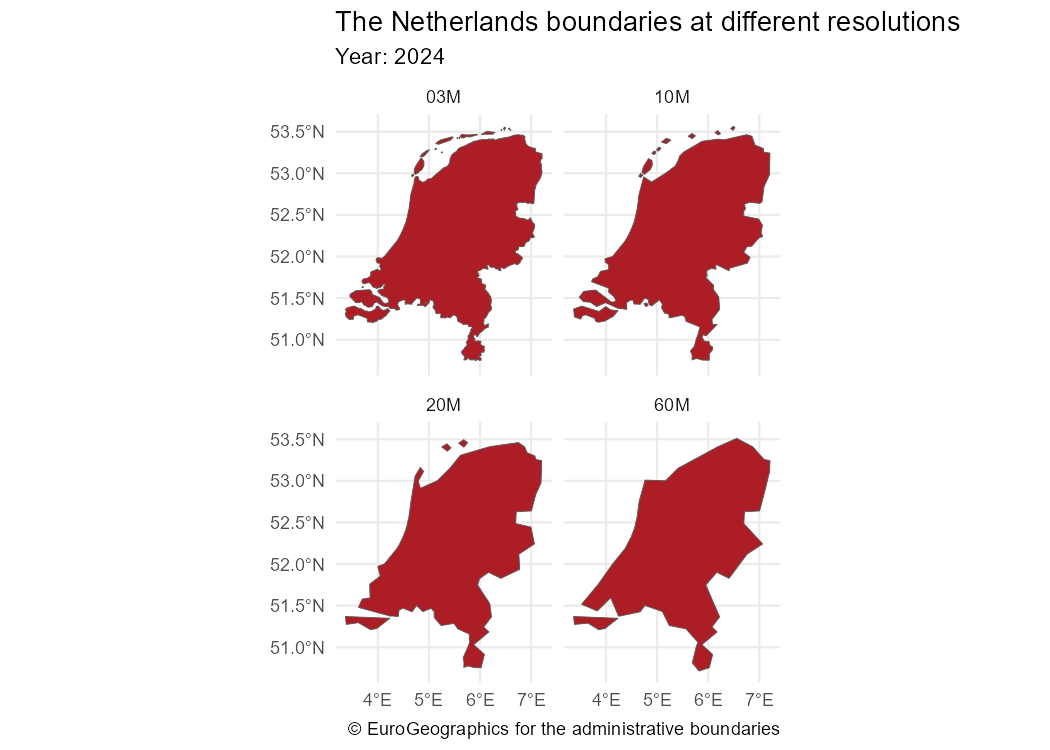
Advanced example: thematic maps
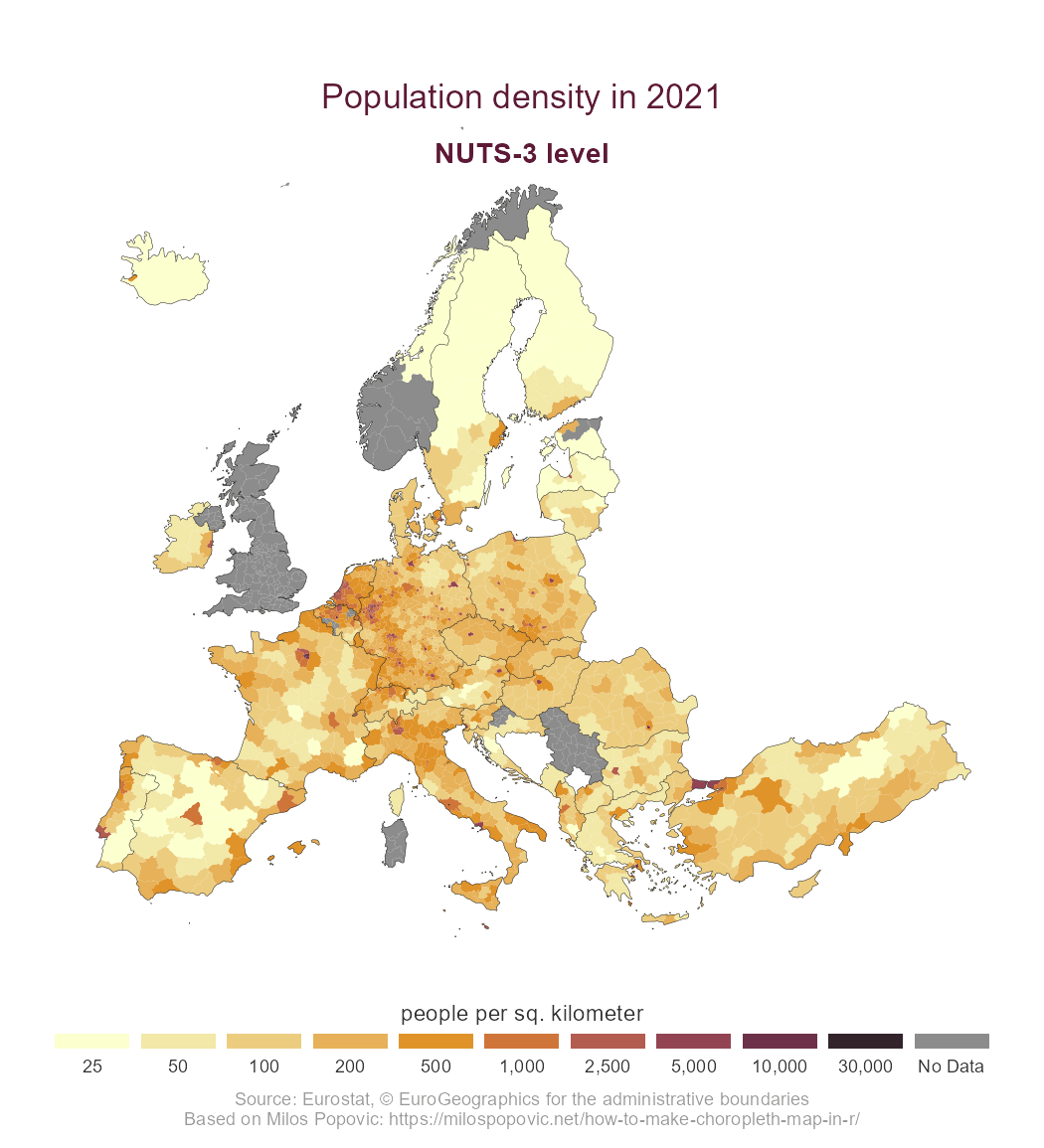
This example shows a thematic map created with the ggplot2 package. The statistical data are retrieved with the eurostat package, following the work of Milos Popovic.
Start by downloading the corresponding geospatial data:
library(giscoR)
library(dplyr)
library(eurostat)
library(ggplot2)

# Retrieve sf objects.
nuts3 <- gisco_get_nuts(
  year = 2021,
  epsg = 3035,
  resolution = 10,
  nuts_level = 3
)

# Get country boundaries at NUTS 0 level.

country_lines <- gisco_get_nuts(
  year = 2021,
  epsg = 3035,
  resolution = 10,
  spatialtype = "BN",
  nuts_level = 0
)
Next, download the statistical data from Eurostat.
# Retrieve Eurostat data.
popdens <- get_eurostat("demo_r_d3dens") |>
  filter(TIME_PERIOD == "2021-01-01")
Finally, merge and transform the datasets to create the plot.
# Merge data.
nuts3_sf <- nuts3 |>
  left_join(popdens, by = "geo")

# Create breaks and labels.
br <- c(0, 25, 50, 100, 200, 500, 1000, 2500, 5000, 10000, 30000)
labs <- prettyNum(br[-1], big.mark = ",")

# Label missing values in the plot.
labeller_plot <- function(x) {
  ifelse(is.na(x), "No data", x)
}
nuts3_sf <- nuts3_sf |>
  # Cut with labels.
  mutate(values_cut = cut(values, br, labels = labs))

# Create palette.
pal <- hcl.colors(length(labs), "Lajolla")

# Create plot.
ggplot(nuts3_sf) +
  geom_sf(aes(fill = values_cut), linewidth = 0, color = NA, alpha = 0.9) +
  geom_sf(data = country_lines, col = "black", linewidth = 0.1) +
  # Center on Europe with EPSG 3035.
  coord_sf(
    xlim = c(2377294, 7453440),
    ylim = c(1313597, 5628510)
  ) +
  # Configure legends.
  scale_fill_manual(
    values = pal,
    # Label missing values.
    labels = labeller_plot,
    drop = FALSE,
    guide = guide_legend(direction = "horizontal", nrow = 1)
  ) +
  theme_void() +
  # Configure the theme.
  theme(
    plot.title = element_text(
      color = rev(pal)[2],
      size = rel(1.5),
      hjust = 0.5,
      vjust = -6
    ),
    plot.subtitle = element_text(
      color = rev(pal)[2],
      size = rel(1.25),
      hjust = 0.5,
      vjust = -10,
      face = "bold"
    ),
    plot.caption = element_text(color = "grey60", hjust = 0.5, vjust = 0),
    legend.text = element_text(color = "grey20", hjust = 0.5),
    legend.title = element_text(color = "grey20", hjust = 0.5),
    legend.position = "bottom",
    legend.title.position = "top",
    legend.text.position = "bottom",
    legend.key.height = unit(0.5, "line"),
    legend.key.width = unit(2.5, "line")
  ) +
  # Add labels.
  labs(
    title = "Population density in 2021",
    subtitle = "NUTS 3 level",
    fill = "people per square kilometer",
    caption = paste0(
      "Source: Eurostat, ",
      gisco_attributions(),
      "\nBased on Milos Popovic's work"
    )
  )
Caching
Large datasets, such as LAU or high-resolution files, can exceed 50 MB. Set a cache directory with:
gisco_set_cache_dir("./path/to/location")Files are stored in the local cache for faster repeated access.
Contributing
See the GitHub repository for source code.
Contributions are welcome.
- Use the issue tracker for feedback and bug reports.
- Send pull requests.
- Star giscoR on GitHub.
Citation
To cite ‘giscoR’ in publications use:
Hernangómez D (2026). giscoR: Download Eurostat GISCO Spatial Data. doi:10.32614/CRAN.package.giscoR https://doi.org/10.32614/CRAN.package.giscoR. https://ropengov.github.io/giscoR/.
A BibTeX entry for LaTeX users is:
@Manual{R-giscoR,
  title = {{giscoR}: Download Eurostat GISCO Spatial Data},
  doi = {10.32614/CRAN.package.giscoR},
  author = {Diego Hernangómez},
  year = {2026},
  version = {1.2.0.9000},
  url = {https://ropengov.github.io/giscoR/},
  abstract = {Tools to download global and European spatial data from the Eurostat GISCO (Geographic Information System of the Commission) data distribution <https://ec.europa.eu/eurostat/web/gisco>. The package provides helpers for country boundaries, Nomenclature of Territorial Units for Statistics (NUTS) regions, administrative units, statistical units, transport networks, basic service locations and other GISCO datasets. This package is neither affiliated with nor endorsed by Eurostat.},
}
General copyright
Eurostat’s general copyright notice and license policy applies. Some datasets have additional download and usage provisions. The download and use of these data are subject to acceptance of those provisions. See the administrative units and statistical units, grids and basic services for more details, including source-specific conditions.